
What Is EXIF Data? A Photo Privacy Guide
Every photo contains hidden metadata. Learn what EXIF data is, what it reveals, why GPS...
Read guideRead the EXIF buried in any image: the camera, the exposure, the date, and often the exact GPS location it was taken. A quick privacy check before you post, done entirely in your browser so nothing is uploaded.
Supports JPG, PNG, WEBP. Big files just take a moment longer.
Drop a photo and the tool reads its metadata in your browser. The screenshot below is a real readout from a test photo we tagged with a genuine iPhone EXIF payload, GPS included.
JPG, PNG or WEBP. It loads instantly and stays on your device. HEIC users: convert to JPG first with the HEIC tool and the record carries over.
The tool lists the file facts, the real dimensions, the camera make and model, the orientation, and flags whether an EXIF block and a GPS block are present. Here it read Apple, iPhone 15 Pro, and detected the GPS block, all in the browser.
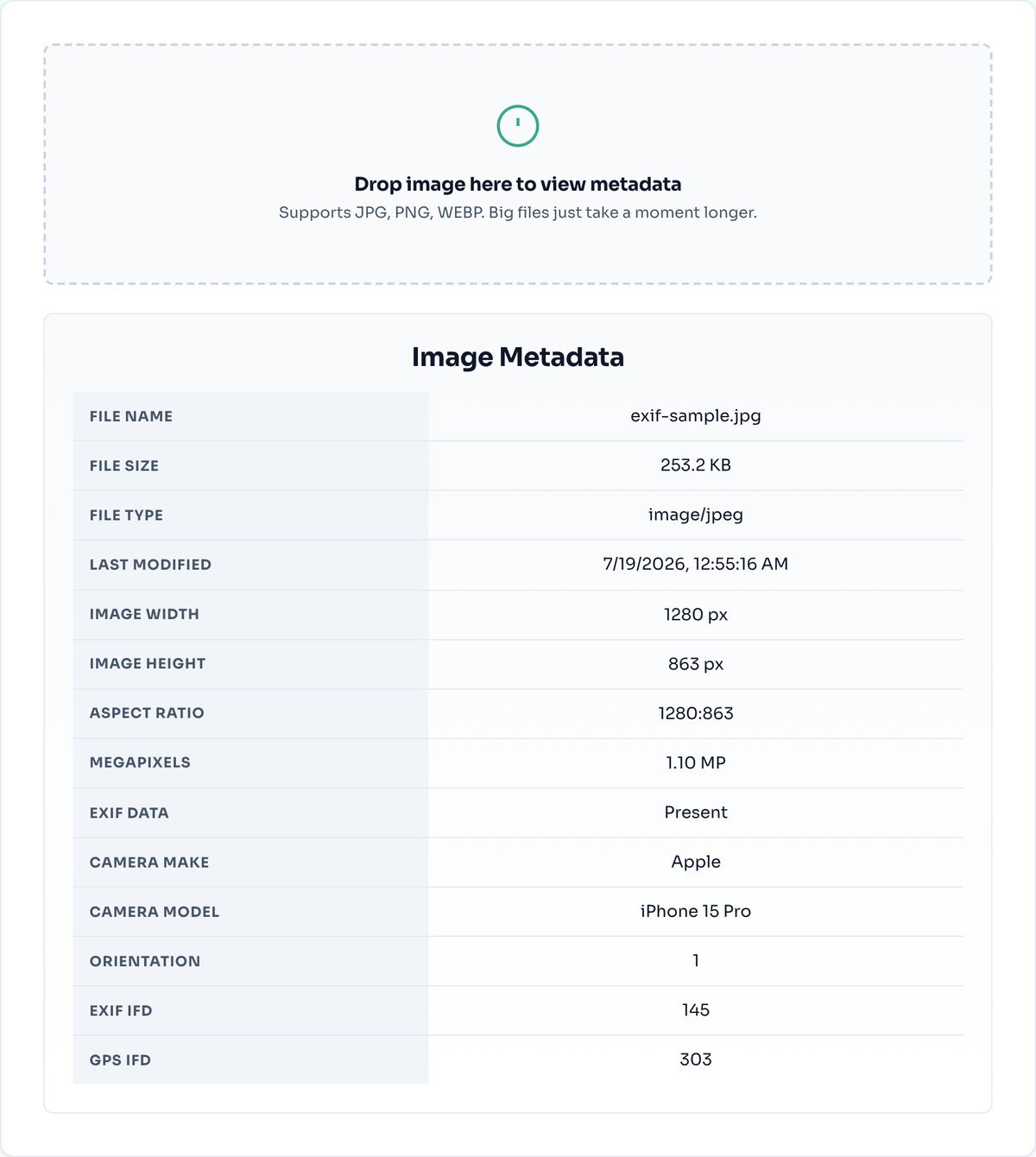
Most of what a photo records is harmless: the camera model, the exposure, the date. The one that matters is location. When your phone has location services on for the camera, it writes the GPS coordinates of where the photo was taken straight into the file, accurate to within a few metres.
If that photo was taken at home, that coordinate is your home address, and it rides along silently through every copy, email and upload until something strips it. This tool shows you whether that GPS block is present so you can decide before you post. To actually remove it, run the photo through the Image Compressor or the Image Converter: both rebuild the image from raw pixels, and a rebuilt file has no header to inherit.
EXIF is a block of structured fields written into the header of a JPEG or HEIC file by the camera the moment you press the shutter: make and model, lens, exposure, date, and, when location is on, GPS coordinates. It travels with the file through copies, email and messaging, invisibly, because image viewers show you the pixels and skip the header.
This viewer parses that header in your browser and shows you what is there, nothing more. Reading never modifies your file. Stripping is a separate job, handled reliably by any tool here that re-encodes from pixels, since a rebuilt file simply has no old header to carry.
The viewer detects and reports that a GPS block is present, which is what matters for privacy. It does not plot the exact coordinates on a map. If a block is there, treat the location as recorded and strip it.
This tool only shows you what is in the file. To remove metadata, use a tool that re-encodes the image, like the compressor or converter. Reading here never changes your original.
Many photos carry no EXIF at all, screenshots, images saved from the web, or files already processed by another tool. An empty record is normal and usually means the data was already stripped.
No. Everything is read from the file in your browser using the FileReader API; the GPS shown comes from inside the photo itself, and nothing is transmitted anywhere. You can run this tool with your wifi switched off and it works exactly the same.
Yes. If location was on when you shot it, a photo taken at home carries the exact coordinates of your home, accurate to a few metres, and anyone you send the file to can read them with free software. It is the single best reason to check a photo before posting it.
EXIF lives mainly in JPEG and HEIC files. PNG uses a different, much lighter metadata system, and cameras and phones only write the full record to their photo formats, so a PNG or a screenshot usually has little to show. That is normal, not a failure to read it.
Run the photo through the Image Compressor or any pipeline tool here. They rebuild the image from raw pixels, and EXIF does not survive that rebuild, so the output comes out clean. Check it by dropping the result back into this viewer: the fields will be gone.
The big ones, Instagram, Facebook and X, strip it from the copies they show publicly. But a photo you email, message or upload to a smaller site keeps everything, and even on big platforms the original you sent them still carried the data. Do not rely on the platform; strip it yourself when it matters.
Yes, and this is exactly the kind of file you should check. Because the reading happens on your device, a scan of a contract or an ID never goes anywhere, and you can see whether it carries a creation date, a device name or a location before you send it to a stranger.
Re-encodes from pixels, so the EXIF comes out stripped.
Open toolHide faces, plates and text with real pixel destruction.
Open toolClaim a photo before it travels.
Open toolConvert iPhone photos so anything can open them.
Open toolSwitch formats; EXIF does not survive the trip.
Open toolCut away parts of a photo that say too much.
Open toolRead the visible text out of screenshots and scans.
Open toolExtract the dominant colours from any image.
Open toolEvery photo contains hidden metadata. Learn what EXIF data is, what it reveals, why GPS...
Read guideMost people redact by drawing a box or smudging a blur over the part they want hidden. A...
Read guideYou drop a photo into a free online compressor, a bar fills up, and a smaller file comes back...
Read guideThe old trick of counting fingers barely works any more. AI images have gotten good enough that...
Read guide

