
What Is EXIF Data? A Photo Privacy Guide
Every photo contains hidden metadata. Learn what EXIF data is, what it reveals, why GPS...
Read guideRead words out of a screenshot, a scan or a photo and get editable text back. It runs in your browser, so the image and the text never leave your device. We benchmarked it against our own reference passage and published every score below, including the two cases where it falls apart.
JPG, PNG, WEBP, paste from clipboard works too
Cmd+V to paste a screenshot
Three steps, and the text lands in a box you can edit before you copy it anywhere.
Drag a file across, click to browse, or hit Cmd+V with a screenshot on the clipboard, which is the fastest route for anything already on your screen. The image appears above the result so you can compare the two.
The language selector is not decoration. It decides which trained model reads your image, and it is the difference between getting accented characters back and losing them. Pick the language the text is written in, then click Extract Text.
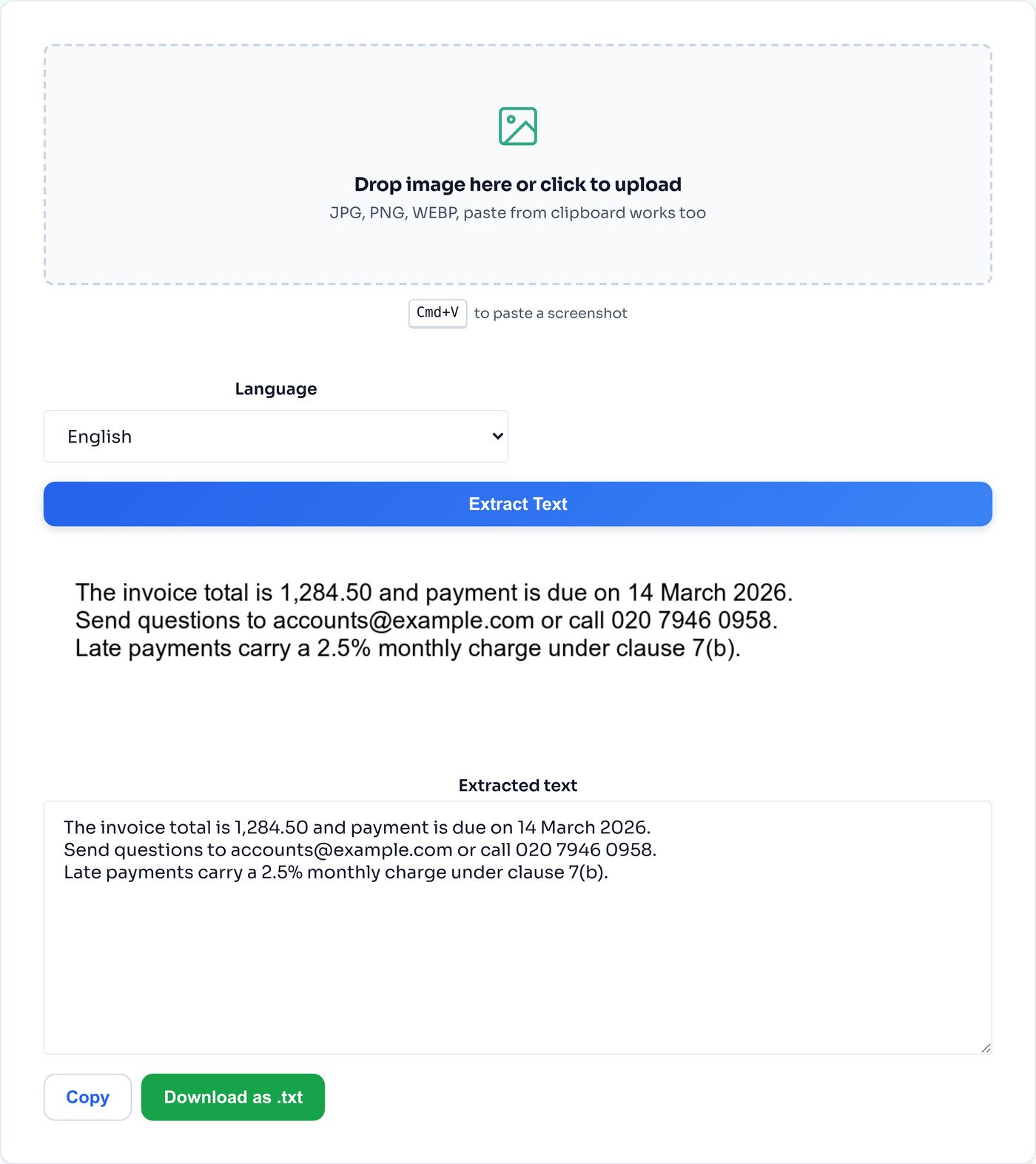
The output box is editable on purpose. OCR does not tell you when it has guessed, so scan the numbers first, fix anything wrong, then copy the text or download it as a .txt file.
We wrote one 189 character reference passage, damaged it twelve different ways, ran every version through this tool and compared the output to the original.
| What we fed it | Character errors | Accuracy |
|---|---|---|
| Clean 1200px screenshot | 0 | 100% |
| Faint grey text, 12% contrast gap | 0 | 100% |
| Screenshot saved as a quality 18 JPEG | 0 | 100% |
| Mild phone photo, 2.5 degree skew | 0 | 100% |
| Full page at 5000 by 7000 pixels | 0 | 100% |
| Very large page, 10000 by 14000 pixels | 1 | 99.5% |
| Spanish passage, Spanish model | 3 | 98.5% |
| Spanish passage, English model | 3 | 98.5% |
| Print-style handwriting typeface | 3 | 98.4% |
| Formal cursive typeface | 18 | 90.5% |
| Thumbnail, 264 by 57 pixels | 174 | 7.9% |
| Hard phone photo: 6 degree skew, vignette, noise, defocus | 174 | 7.9% |
Method: a 189 character passage of invoice text with punctuation, an email address, a phone number and decimals. Accuracy is one minus the Levenshtein distance over the reference length, so a transposed character counts against us. Tested in Chrome 150 on macOS with Tesseract.js 5 and the standard English model unless stated.
Almost every OCR guide tells you to use high contrast text. Our faint test was mid grey ink on light grey paper, a 12 percent luminance gap, the kind of faded scan people apologize for. It scored 100 percent. So did a screenshot crushed to quality 18 JPEG, artifacts and all. The engine binarizes the image before it does anything else, and it is very good at deciding which side of the line a pixel falls on.
What it cannot do is invent detail that was never captured. The same passage as a 264 by 57 thumbnail scored 7.9 percent, because at that size the strokes that separate an e from a c are simply not there. Skew compounds it: Tesseract works along horizontal text lines, and once a photo is tilted six degrees with soft focus on top, the line finder loses the rows and the character recognizer never gets a fair look.
The practical rule that falls out of this is worth more than any contrast advice. Give it the largest, straightest version of the image you have. A dim, ugly, heavily compressed screenshot at full size will beat a crisp, bright photo taken at an angle every time.
This is the part that catches people out. OCR does not return an empty box or a warning when it cannot read something. It returns text, formatted like text, that happens to be nonsense. Here is the literal output from the hard phone photo in the table above, the one that scored 7.9 percent:
CARIN
OER ANCS T i EEE
en PRCT
<5 Ebi RRR
NU 2 LAR -
eo 1284.50 and payment due on 14 March 202
ACCOUNts@ ey -. pes
4590 Acc mont €-C0om or call 029 7946 0958 CEO
Notice that it is not uniformly wrong. Line six is almost correct, and a phone number is sitting there looking plausible while the digits have quietly changed from 020 to 029. That mix of right and wrong is exactly why an OCR result should never go straight into a spreadsheet or an invoice without being read first.
The same caution applies to the cursive test, which looks much better on paper at 90.5 percent. Its errors were 1,284.50 read as 7,287.50 and clause 7(b) read as clavse 16 ). The sentences around them are perfect. The only characters that changed were the ones carrying the money and the reference, which is the worst possible place for an error to hide.
We ran an identical Spanish passage twice, once with the English model and once with the Spanish one. Both scored 98.5 percent, which looks like the setting does not matter. Reading the output tells a different story.
The English model produced ¢Alguna duda? instead of ¿Alguna duda? and stripped the accents from según and cláusula. It has no inverted question mark in its character set and no reason to expect one. The Spanish model got every one of those right, then broke an email address into cuentas (Qejemplo.com instead.
So the models trade one class of error for another rather than being better or worse overall. Choose the language of the text when accents and punctuation matter, which for anything you intend to publish or paste into a document means always. Eighteen languages are in the selector here, and each one downloads its trained data the first time you use it.
The models here are trained on printed and typeset characters. We tested two handwriting-style typefaces as stand-ins, scoring 98.4 and 90.5 percent, and both corrupted digits. Real handwriting is more variable than any typeface, so we will not put a number on it. If the source is handwritten, expect to correct it.
What comes back is a stream of lines, not a table. Columns get interleaved, cells run together and the structure of a form is lost. For a two column page or a spreadsheet screenshot, crop each column separately and run them one at a time.
This tool reads images. Send the pages through PDF to JPG first, then bring the images here. And if the PDF already has selectable text, skip OCR entirely and copy it directly, because that text is perfect and this will only ever approximate it.
Resolution was the single strongest factor in our tests, by a wide margin. Never resize or compress an image before running OCR on it, and if you only have a small version, enlarging it with the image upscaler first sometimes gives the line finder enough to work with.
Our mild 2.5 degree photo scored 100 percent and the 6 degree one scored 7.9. That is how sharp the cliff is. Square the image up with the rotate tool before extracting, and it costs you ten seconds to avoid a useless result.
Photographs, logos and page furniture give the line finder extra things to misread as characters. Trimming to the paragraph you actually want with the crop tool removes that noise, and on a multi column page it is the only way to keep the reading order intact.
On a clean screenshot of printed text, exactly right. We ran a 189 character reference passage through this tool and scored the output character by character: a 1200 pixel wide screenshot came back with zero errors, and so did the same text faded to a 12 percent contrast gap, saved as a quality 18 JPEG, or blown up to a 35 megapixel page. Accuracy collapses in two situations, and neither is the one people expect. See the benchmark table above for all twelve results.
Resolution and geometry, not contrast. The same passage scaled down to a 264 by 57 thumbnail scored 7.9 percent, and a photo with 6 degrees of skew, a vignette, noise and soft focus also scored 7.9 percent. Faint grey text on grey paper, which everyone warns about, scored 100 percent. If a result comes back as nonsense, the fix is almost always more pixels or a straighter image, not more contrast.
We cannot give you an honest number for real handwriting because we did not test real handwriting, and neither has anyone quoting a percentage at you. What we can tell you is that a formal cursive typeface, which is the friendliest possible stand-in, scored 90.5 percent, and its errors landed on the digits: 1,284.50 came back as 7,287.50. Genuine handwriting varies far more than a typeface does, so treat any handwritten result as a draft and check every number by hand.
It changes which mistakes you get more than how many. Our Spanish passage scored 98.5 percent with the English model and 98.5 percent with the Spanish one. The English model dropped the inverted question mark and the accents, turning segun and clausula into unaccented words. The Spanish model restored all of those and then mangled an email address instead. Pick the right language when diacritics matter, which is most of the time.
Larger than you are likely to need. We fed it a 10000 by 14000 pixel page, 140 megapixels, and it returned 99.5 percent accuracy in about six seconds on a 16 GB laptop in Chrome. There is no fixed pixel ceiling in the tool. The real constraint is the memory on the device doing the work, so a phone will give up long before a desktop will.
The OCR engine and the language data are fetched once from a CDN when you run your first extraction. The browser caches them, so later runs on the same device skip that download entirely. Switching to a language you have not used before triggers one more small download for that language pack.
Not directly, because this tool reads images. Convert the pages to images first with the PDF to JPG tool, then run them through here one at a time. If the PDF already contains selectable text, do not use OCR at all, just select and copy it. OCR is for pixels, not for text a PDF is already carrying.
No. Tesseract.js runs inside your browser tab and the image is read from local memory. The only network requests are for the engine and language files. You can watch that in your network tab, or run an extraction with the machine offline once those files are cached.
Turn PDF pages into images so they can be read here.
Open toolStraighten a skewed photo before extracting.
Open toolTrim to the paragraph you actually want.
Open toolEnlarge a small capture before running OCR.
Open toolHEIC, AVIF or anything else into a readable JPG or PNG.
Open toolSee the camera and location data a photo carries.
Open toolBundle the pages back into a single document.
Open toolRedact the parts of a scan you do not want readable.
Open toolEvery photo contains hidden metadata. Learn what EXIF data is, what it reveals, why GPS...
Read guideMost people redact by drawing a box or smudging a blur over the part they want hidden. A...
Read guideYou drop a photo into a free online compressor, a bar fills up, and a smaller file comes back...
Read guideEvery platform wants a slightly different size, and getting it wrong crops your face off or...
Read guide

