
PNG Transparency: How to Create and Use Images With Clear Backgrounds
PNG transparency lets you layer images over any background without white boxes or hard edges...
Read guideCircle crop an image in three moves: drop it in, drag it into the circle, download a round PNG with transparent corners. Add a border or a solid background if you want one. Your photo never leaves your browser.
JPG, PNG, WEBP or GIF. Drop several files to crop them all to circles at once.
Or paste a copied image with Ctrl+V / Cmd+V
We took a 1100 x 741 lake photo (a 161.2 KB JPG), left the tool at its default centered framing, and exported it. The images below are the actual files the tool produced, at 360 px so this page stays light.

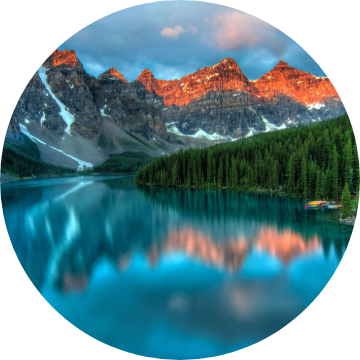
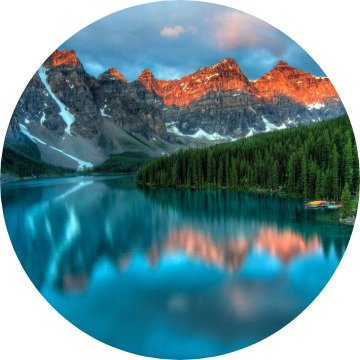
| Export | Dimensions | Transparent PNG | JPG on white |
|---|---|---|---|
| Original resolution | 741 x 741 | 859.8 KB | 123.1 KB |
| 512 preset | 512 x 512 | 446.0 KB | 69.1 KB |
| Custom 360 | 360 x 360 | 232.9 KB | 37.1 KB |
The transparent PNG came out 6.3 to 7 times the size of the JPG at every size we tried, and the full-resolution PNG is 5.3 times the size of the photo it came from. That is not a bug. PNG is lossless, so it keeps every pixel of a detailed photo exactly, while JPG throws away detail you mostly cannot see. We also tried a white background saved as PNG: 860.0 KB, almost identical to the transparent one. Filling the corners is not what shrinks the file. Switching to JPG is.
In the 741 px PNG, 21.25 percent of the pixels are fully transparent and 78.25 percent fully opaque. The remaining 0.5 percent is the soft edge of the circle, partly transparent so the curve looks smooth instead of stepped.
Every image file is a rectangle. There is no such thing as a round JPG or a round PNG; a "round image" is a square file whose corners are empty. A circle that touches all four sides of a square covers pi divided by four of it, about 78.5 percent, so roughly a fifth of the file is corner.
PNG can mark those corner pixels as transparent, which is why the circle sits cleanly on a white page, a dark slide or a colored banner. JPG has no transparency at all. Save the same circle as a JPG and the corners have to be painted some color, usually white or black, and the result is a square with a circle drawn on it. On a page with a matching background nobody can tell. On anything else, the square shows.
So the rule is simple. If you do not know what the circle will sit on, export the transparent PNG. If you do know, for example a white document, pick a solid background in the tool, switch the format to JPG, and get a file roughly a sixth to a seventh of the size. WEBP can also hold transparency, but plenty of upload forms and editors still refuse it, so this tool sticks to PNG and JPG.
If the site draws the circle itself, a circle file gains you nothing. If it shows your image as-is, the round shape has to be in the file.
| Where the image goes | What to upload | Why |
|---|---|---|
| Profile photo on a social or chat app | A square | Avatar spots on these sites are drawn round by the site, from a square file. If the upload screen shows a round guide over your photo, that is the site cropping for you. Frame it with the profile picture cropper if you want to see the result first. |
| GitHub avatar | A square PNG or JPG | GitHub's profile reference asks for PNG, JPG or GIF, under 1 MB and smaller than 3000 x 3000, and recommends about 500 x 500. The 512 x 512 resizer covers it. |
| Slack profile photo | A square, 512 to 1024 px | Slack's help center asks for at least 512 x 512 and no larger than 1024 x 1024. |
| Team or about page on your own site | Either | A circle PNG works anywhere. If you control the CSS, a square photo with border-radius: 50% looks the same and stays a smaller JPG. |
| Slides, documents, posters, email signatures | A circle PNG | These place your image exactly as the file is. A transparent circle sits on any background the design uses. |
| Logos, badges and stickers | A circle PNG | Transparent corners let the mark sit on any color. For printed stickers, check the printer's template for bleed and cut line before sending artwork. |
Site rules change. The two requirements quoted above come from each company's own help pages, checked in November 2026. For anything else, trust the upload screen in front of you over any list, ours included.
The circle drops the corners first. Anything near the edges of a square frame, like a raised hand, a logo tagline or the tips of a wide wordmark, will not survive. Drag the subject to the middle, then zoom until it fills the circle with a little air around it.
It exports exactly the pixels inside the circle, with no stretching. On our lake photo that was 741 x 741. Pick a larger size than that and the tool tells you the result will be soft, because enlarging cannot add detail that was never there.
For a person or product floating on transparency inside the circle, run the full photo through the background remover first, then bring the cutout here and add a solid background color. Cropping first throws away the edges that tool works from.
The image crop tool does free and fixed-ratio rectangles. For a plain square at an exact size, the 400 x 400 and 512 x 512 pages are faster.
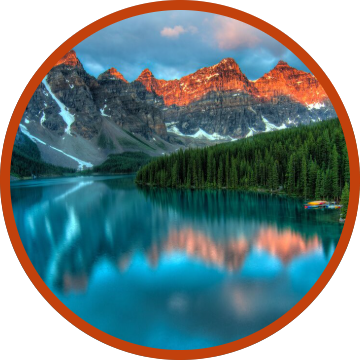
There is no detection. In single mode you drag it into place. In batch mode every image is simply centered, so an off-center subject in a batch will be cut. Frame those one at a time.
The output is always a perfect circle in a square file. For a rounded rectangle or a frame shape you need a design app.
JPG cannot store transparency, so the JPG option only appears once you choose a solid background. If you need see-through corners, keep PNG and accept the larger file.
Most browsers cannot decode iPhone HEIC files, so convert them with the HEIC to JPG tool first. Exports are capped at 8192 x 8192, which is beyond what any avatar or slide needs.
Drop the image into the box at the top of this page, or paste it with Ctrl+V. Drag it so the part you want sits inside the circle, zoom with the slider, mouse wheel or a pinch, then press Download. You get a square PNG with the circle in the middle and transparent corners. It takes a few seconds and the image never leaves your device.
Because only PNG keeps the corners transparent. JPG has no transparency, so a circle saved as JPG has to fill its corners with a color. The cost is size: our 741 x 741 circle was 859.8 KB as a transparent PNG and 123.1 KB as a JPG on white.
Yes. Set Corners to Solid color and pick the color, then switch the format to JPG for a much smaller file. Use this when you know exactly what the circle will sit on, like a white document. Keep PNG if the background might change.
Usually not. Social and chat apps draw your avatar as a circle themselves, from a square upload, so a square file is enough there. A real circle file matters where the image is shown exactly as it is: slides, documents, email signatures, websites you do not control the styling of, and logos placed on colored backgrounds.
Original resolution keeps every pixel that sits inside the circle and adds none, so it is the safe default for quality. 512 x 512 suits most avatar and icon slots. Going larger than the original only enlarges what is there, and the tool warns you when a chosen size is bigger than the real detail in the circle.
Yes. Select or drop several files together and a batch button appears. Each image is centered in a circle using the size, border and background you set, and they all download as one ZIP. In our test four photos at 512 x 512 came back as a 1657.1 KB ZIP. Batch mode always centers, so frame off-center shots one at a time.
No. The image is read, cropped and saved by your own browser. Nothing is sent to us or anyone else, which you can check by watching the network tab in your browser tools while you use it.
Circle framing tuned for avatars at 400, 512 and 1024.
Open toolRectangles and fixed ratios when you do not want a circle.
Open toolCut the subject out before you crop it round.
Open toolA square at the size most avatar slots ask for.
Open toolA smaller square for lighter uploads.
Open toolShrink a heavy PNG or JPG to a byte limit.
Open toolPNG transparency lets you layer images over any background without white boxes or hard edges...
Read guideA comprehensive comparison of JPG, PNG, and WEBP image formats. Learn when to use each format...
Read guideYour avatar is seen at the size of a fingernail, so it has to work as a shape, not a...
Read guide
