
How to Tell If an Image Is AI-Generated in 2026
The old trick of counting fingers barely works any more. AI images have gotten good enough that...
Read guideThis AI image checker reads the labels hidden inside a picture: Content Credentials (C2PA), IPTC AI tags and the generation settings that Stable Diffusion tools save. It tells you what the file declares about how it was made, and where that declaration sits. Nothing is uploaded.
This reads metadata, not pixels. It does not run an AI detector or judge how the image looks. If no label is found, that does not mean the image is real: AI images often lose their labels as soon as they are screenshotted or re-saved.
JPG, PNG, WEBP, AVIF or HEIC. Read on your device, never uploaded.
The checker never gives a percentage. It sorts what it finds into one of three plain answers and lists every piece of evidence underneath, with the exact block of the file it came from.
The file says it was made by generative AI. That comes from a C2PA "created" action with the IPTC value trainedAlgorithmicMedia, the same value in the file's XMP, or generation settings saved by Stable Diffusion tools such as a PNG "parameters" block or ComfyUI's "prompt" and "workflow" chunks.
It is a claim made by whatever program wrote the file. It is strong evidence when the C2PA signature checks out, and weak when it is plain text anyone could type.
The file says generative AI changed part of an image rather than making all of it. The IPTC term for this is compositeWithTrainedAlgorithmicMedia, which covers inpainting and outpainting, and compositeSynthetic covers a composite with at least one AI element.
The photo underneath may well be real. Something in it was not.
None of the blocks this tool reads declare AI. That is the result for a genuine camera photo, and it is also the result for an AI image that was screenshotted, re-saved or posted to an app that re-encodes uploads.
Treat it as "the file is silent", never as "the image is authentic".
One more result exists for a rare case. A file labeled algorithmicMedia gets "Algorithmic generation declared". IPTC defines that as an image made purely by an algorithm with no training data, so it is computer-made but not generative AI.
C2PA is an open technical standard from the Coalition for Content Provenance and Authenticity. The app that makes or edits an image writes a manifest into the file: who made the claim, the actions taken (c2pa.created, c2pa.edited, c2pa.opened and others), any source files it used, and a digital signature over all of it. "Content Credentials" is the consumer name for the same thing.
Each format has its own slot for it. In a JPG the manifest sits in APP11 segments, split across several when it is large. In a PNG it is a chunk named caBX, in a WEBP a RIFF chunk named C2PA, and in AVIF and HEIC a uuid box. This checker reads all four, decodes the manifest's CBOR data itself, and shows the claim generator, every action with its digital source type, the ingredient list, and the names written in the signing certificate.
What it does not do is validate the signature or check that the pixels still match the hashes in the manifest. That needs the signer's certificate chain and a trust list, so we say "not verified" next to the certificate names. For a full signature check, open the file in the Content Authenticity Initiative verify site.
C2PA is the strongest signal because it can be signed. The rest are plain text that any program, or person, can write.
| Signal | Where it sits in the file | What counts as AI |
|---|---|---|
| C2PA manifest (Content Credentials) | JPG APP11, PNG caBX, WEBP C2PA chunk, AVIF/HEIC uuid box | An action with digitalSourceType trainedAlgorithmicMedia, compositeWithTrainedAlgorithmicMedia or compositeSynthetic |
| IPTC DigitalSourceType | XMP packet (Iptc4xmpExt:DigitalSourceType, attribute or element form) | The same IPTC values, written as plain XMP text |
| Remote manifest link | XMP dcterms:provenance | Reported, not fetched, so nothing leaves your device |
| Stable Diffusion settings | PNG text chunk "parameters", or EXIF UserComment in a JPG | The prompt, seed and sampler that AUTOMATIC1111-style tools save |
| ComfyUI graph | PNG text chunks "prompt" and "workflow" | The node graph ComfyUI's save node writes |
| Generator names | EXIF Software, Make, Artist; XMP CreatorTool; C2PA claim generator | Names such as Midjourney, DALL-E, Stable Diffusion, Firefly, NovelAI or ComfyUI |
We checked the Stable Diffusion and ComfyUI formats against the source code of AUTOMATIC1111's web UI and ComfyUI. A generator name in a free-text field is the weakest signal here: it only means some program wrote that word.
We ran this page's code on public test files from the C2PA project's own repository (contentauth/c2pa-rs) and on files we labeled ourselves. For every embedded manifest, the generator and actions it reported matched what the official c2pa-python 0.39.0 library read from the same file.
| File | What is in it | What the checker reported | Verdict |
|---|---|---|---|
| C.jpg (C2PA project) | Signed manifest in 1 APP11 segment | Claim generator make_test_images 0.33.1; c2pa.created with algorithmicMedia | Algorithmic generation declared |
| CA.jpg (C2PA project) | Manifest split over 2 APP11 segments | c2pa.opened, c2pa.color_adjustments, 1 ingredient | No AI labels found |
| C_with_CAWG_data.jpg (C2PA project) | Signed manifest | c2pa.created with digitalCapture (a camera) | No AI labels found |
| cloud.jpg (C2PA project) | No embedded manifest, link in XMP | Remote manifest at cai-manifests.adobe.com, not fetched | No AI labels found |
| sample1.png, .webp, .avif, .heic (C2PA project) | Unsigned source images | Nothing | No AI labels found |
| Same 4 files, signed by us as AI | C2PA in caBX, C2PA chunk, uuid box, uuid box | c2pa.created with trainedAlgorithmicMedia, in all 4 formats | AI generation declared |
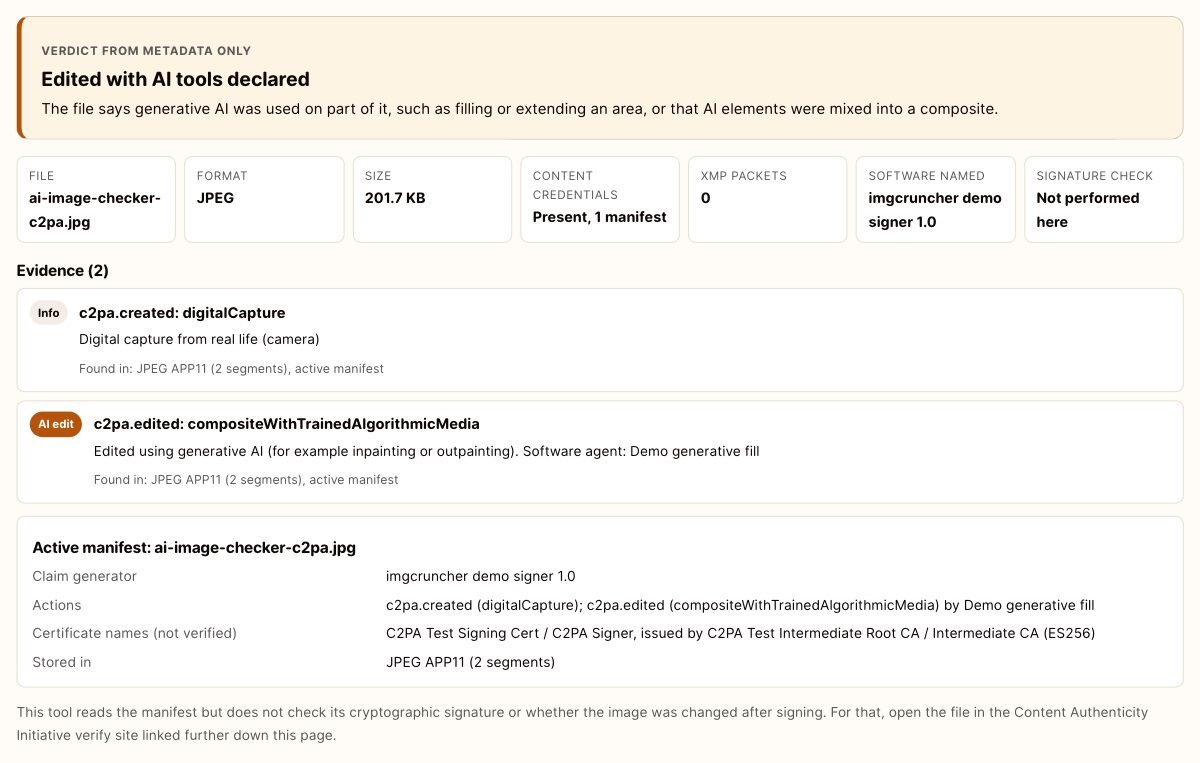
| Signed JPG with an AI edit | C2PA in APP11 | c2pa.created digitalCapture, then c2pa.edited with compositeWithTrainedAlgorithmicMedia | Edited with AI tools declared |
| PNG with a "parameters" chunk | Stable Diffusion settings text | Prompt, steps, sampler and seed | AI generation declared |
| PNG with ComfyUI chunks | "prompt" and "workflow" JSON | Both chunks | AI generation declared |
| JPG with Stable Diffusion EXIF | UserComment, UTF-16 encoded | Steps and sampler found in the comment | AI generation declared |
| JPG with IPTC XMP label | Iptc4xmpExt:DigitalSourceType | trainedAlgorithmicMedia | AI generation declared |
The C2PA project files are signed with its public test certificate, so a signature check would call them untrusted. That is expected for test files and does not change what the manifest says. Our own files are ordinary photos that we labeled, which is the point: a label is only a claim.
An AI label only lasts as long as nobody re-saves the file. Here is how little it takes to lose one, measured with this checker.
We started from our demo JPG: a 800 by 539 photo that weighed 89,386 bytes before signing. Adding a C2PA manifest, including the small preview image the signing library stores inside it, took it to 206,491 bytes, and the checker reported "Edited with AI tools declared" from a manifest split across 2 APP11 segments.
Then we re-saved labeled files the ordinary way and checked each copy again:
So the label survives only as long as every program that touches the file chooses to carry it. A screenshot never does, because it is a new image of your screen.
Only some tools write these labels, and only into the file they hand you. These are ones whose makers document it:
Plenty of generators write nothing at all, and some add an invisible watermark in the pixels instead, such as Google's SynthID. Pixel watermarks need the maker's own detector; a metadata reader like this one cannot see them.
Found a label you would rather not pass on, or a prompt you did not mean to publish? For a JPG, Remove EXIF Data deletes the Content Credentials block along with the EXIF and XMP without re-compressing the picture. For other formats, a tool that re-encodes the image, like the Image Compressor, drops these blocks. To see what else a photo is carrying, such as camera details and GPS, open it in the Image Metadata Viewer.
There is no trained model here and no pixel forensics. An AI image with its metadata stripped and a real photo look the same to this tool. Services that do claim to judge pixels give probabilities, and those are wrong often enough that you should not rely on one alone.
"No AI labels found" only means the file is silent. Labels disappear on a screenshot, a re-save or an upload to an app that re-encodes, so a silent file proves nothing either way.
It reads the manifest and shows the certificate names, but does not check the signature, the trust chain or the content hashes. A forged or tampered manifest would read the same here. Use the CAI verify site for that.
If a file only links to Content Credentials stored online, you will see the link, not its contents, because fetching it would tell that server which image you are checking.
Invisible watermarks such as SynthID live in the image data, not the metadata, and need their maker's detector.
It is exact about one narrow thing: what the file says about itself. If a C2PA manifest, an IPTC DigitalSourceType or a Stable Diffusion parameters block is in the file, it finds it and shows you where. It never looks at the pixels and never guesses, so it has no accuracy percentage to quote. On the 35 files we ran through it while building this page, it reported every label the C2PA project shipped or that we planted, and found nothing in the files that had none.
Start with the file. Drop it in here: if the maker declared AI in Content Credentials or IPTC metadata, you will see it in seconds. If nothing is found, the label was probably stripped along the way, so look for the original source, run a reverse image search, and check the image itself for the usual tells in hands, text and backgrounds. No single check settles it.
Content Credentials is the public name for C2PA, an open standard where the app that made or edited an image writes a signed record into the file. A content credentials check reads that record: which app made the claim, what actions it lists, such as created or edited, and whether it says generative AI was involved. This page reads the record. The Content Authenticity Initiative verify site also checks the signature.
Because the copy you have is probably not the original file. OpenAI and Adobe both say they attach C2PA data to images their tools make, but a screenshot, a re-save in an editor or an upload to an app that re-encodes images throws that data away. In our test, re-saving a C2PA image with Pillow and with ImageMagick removed the manifest both times.
Both. Removing it takes one re-save. Faking it is just as easy: the two demo files on this page are ordinary photos that we labeled ourselves, one with a Stable Diffusion text block and one with a C2PA manifest signed with the C2PA project's public test certificate. A label tells you what the file claims. Only a signature check against a trusted certificate tells you who made the claim.
No. The file is read with JavaScript on your own device, and no image data is sent anywhere. That is also why this tool does not fetch remote Content Credentials: some files only carry a link to a manifest stored online, and opening that link would tell the host which image you are looking at.
Camera, date and GPS: the rest of what a photo carries.
Open toolHide faces and text before you share a picture.
Open toolRe-encodes from pixels, so metadata blocks do not survive.
Open toolA visible mark that survives screenshots, unlike metadata.
Open toolThe old trick of counting fingers barely works any more. AI images have gotten good enough that...
Read guideEvery photo contains hidden metadata. Learn what EXIF data is, what it reveals, why GPS...
Read guideYou drop a photo into a free online compressor, a bar fills up, and a smaller file comes back...
Read guide
